
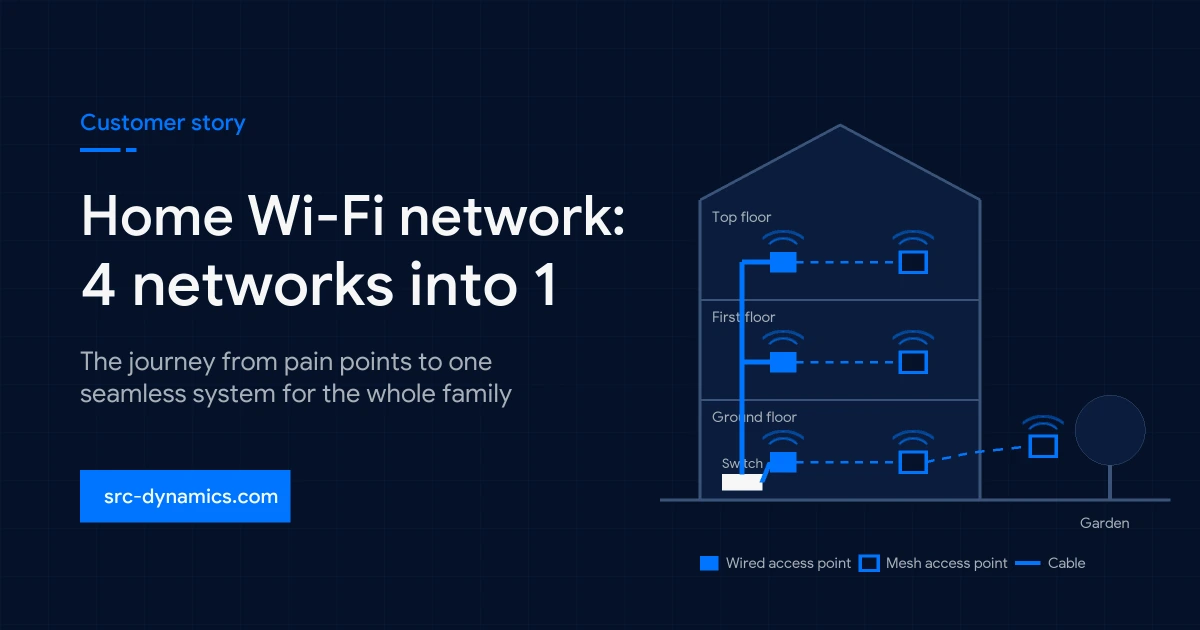

Our home Wi-Fi network design, before and after
Cust XX: one home Wi-Fi network for the whole family
Your privacy comes first
Every customer story we share is anonymised. We never publish a customer's name, address, location, photos of their home or any detail that could identify them or their family. "Cust XX" stands in for the homeowner, and personal details have been generalised.
Cust XX lives with his wife and their children in a three-floor family home. On paper, the house had everything a connected family needs: a fast internet line, plenty of devices and a router on almost every floor. In practice, it had four Wi-Fi names, a garden with no signal and a family that had learned to plan their day around where the internet worked.
This is the journey from those pain points to one carefully designed home Wi-Fi network that gave every person in the house their time back.
Home Wi-Fi network pain points
Like most, this home Wi-Fi network had grown one device at a time. When the first floor felt slow, a second router went in. When the top floor dropped out, another joined it, and later an extender was added to patch a corner. Each broadcast its own name: Home, Home_1F, Home_Up and Home_Ext. Walking up the stairs meant losing the connection and joining the next network by hand. There was no roaming, only reconnecting, and everyone in the house felt it differently.
Business meetings
Video calls dropped between floors
Family video calls
Frozen faces and delayed voices
Online gaming
High ping and lost matches
Match nights
Football streams kept buffering
Household staff
No private network of her own
The garden
A complete dead zone
The meeting that froze
Cust XX, business owner
Much of Cust XX's business happens on video calls. That morning he was presenting a proposal to a new partner from the ground floor. Ten minutes in, he walked upstairs to fetch a document from his study, laptop in hand. Somewhere between the landing and the study door, the screen froze and his voice cut out mid-sentence. By the time the laptop joined the upstairs network and rejoined the call, a colleague had to cover for him.
It was not the first time. He had started taking important calls from one chair in one room, because it was the only place he trusted. For someone whose work depends on sounding composed and reachable, the home Wi-Fi network had become a daily risk.
The calls that kept breaking
His wife, the family's link to relatives abroad
For his wife, the internet is how the family stays close. Friday evenings are for video calls with her parents and her sister's family abroad, the children crowding around the tablet to show off their school projects. Those calls rarely ran smoothly. Faces froze into blurry squares, voices arrived a second late and everyone talked over each other. Carrying the tablet into the kitchen to show her mother a recipe was enough to drop the call.
Her mother even replaced her own router, convinced the fault was on her side. It changed nothing, because the problem was in this house.
The match that was lost
The children, gamers and students
The children had their own words for the problem: lag, high ping, rubber-banding. Their console sat in a top-floor bedroom, connected to whichever network looked strongest at that moment. In fast online games, a fraction of a second decides who wins. One night, in the final round of a tournament they had practised for all week, the connection spiked and the match was gone. Online classes stalled too, and assignments were often submitted from the ground floor.
The goal they heard before they saw
The whole family, on match night
Big football nights are a family ritual. Everyone gathers in the living room with the match streaming on the large screen, the one evening when nobody is on a different floor. It was also when the home Wi-Fi network struggled most. With the television, several phones and a tablet competing for the same overloaded connection, the picture kept dropping to a blurry low resolution, then stopping to buffer.
On the night of a decisive match, the family heard cheering from the street and a flood of notifications lit up their phones while their own screen was still spinning. By the time the stream caught up, everyone already knew the score. For a household that loves the game, a goal seen a minute late takes the whole point out of watching live.
A network of her own
The family's housekeeper
The family's housekeeper lives with them and needs a dependable connection to stay in touch with her own family. The only option had been to share the family's password, which also opened the door to their laptops, cameras and smart devices. The family wanted her to have a good connection of her own, kept completely separate.
The family did not need more devices. They needed the devices to work as one.
What our discovery visit showed
Discovery: what we found
Our work always starts with discovery, not a shopping list. We walked every floor, checked signal strength room by room and traced where the existing cabling actually ran. Two findings shaped everything that followed.
First, the house had very little network cabling. Most rooms had no cable at all, and pulling new runs through finished walls would have meant weeks of disruption to a home the family loved exactly as it was. Second, the devices were not the real issue. Each router was working in isolation, and nothing was designed as one system. Separate networks cannot pass a phone from one floor to the next, and an extender that repeats a signal wirelessly loses speed with every hop.
Design: a home Wi-Fi network built floor by floor
We designed the new home Wi-Fi network around what the house already had, and placed every piece where it would do the most good.
A wired anchor on every floor
We used the existing cabling for what matters most: one main access point per floor, connected by cable, so each floor's traffic travels at full speed.
Mesh where cables could not go
The other access points on each floor connect wirelessly to that floor's wired anchor, forming a wireless mesh. Each link is short and only one hop from a cable, so distant rooms keep a strong signal.
A switch sized to the connection
We selected a switch matched to the internet line and the wired access points, so the heart of the network never becomes the bottleneck, even on a crowded match night.
One name for the whole family
Four networks became one home Wi-Fi network. Phones, laptops and tablets now move to the strongest access point on their own as the family moves around the house.
A private network for household staff
A separate network with its own name and password gives the housekeeper the same strong coverage, fully isolated from the family's devices, cameras and smart home.
Coverage outside, too
The garden and terrace joined the same system, so time outdoors no longer means going offline.
None of this called for the most expensive hardware on the market, or for opening a single wall. It called for the right design: reliable, cost-sensible devices sized to what this family actually uses, with the investment placed where it counts.
Result: the same house, a different week
| Who | Before | After |
|---|---|---|
| Cust XX | Meetings dropped on the stairs | Walks between floors mid-meeting without anyone noticing |
| His wife | Family calls froze and disconnected | Friday calls run the full hour, from any room or the garden |
| The children | Ping spikes and stalled classes | Steady, low ping and assignments sent from their own desks |
| Match night | Buffering while the street cheered first | A sharp stream with every phone in the room online |
| Housekeeper | Shared the family password | Her own reliable network, kept private from the family's devices |
| Garden | No signal | Music, calls and browsing outdoors |
In the evenings, the family now sits in the garden with music playing, and nobody asks which network to join.
Why we share this journey
Cust XX never asked us for access points or a switch. He asked for a home where the internet simply works for everyone in it. That is how every project with us begins: we listen, we investigate and we design around the real problem, not around a product. It is also why our relationship continues after installation. As the family's needs grow into cameras, lighting and automation, the network is ready to grow with them.
We fix problems, not the other way around.
Questions homeowners ask us
Why does my home have several Wi-Fi names?
Usually because routers and extenders were added over time, each creating its own network. Your devices then treat every floor as a different place and must disconnect and reconnect as you move.
Do I need a network cable in every room?
Ideally, yes. We recommend a network cable in every room, as it gives the best speed and reliability, especially in new builds and renovations. It is not a requirement, though. In homes like this one, where most rooms have no cable, one well-placed cable per floor can anchor the system, and additional access points connect wirelessly to it through mesh.
Why does my football stream buffer when the whole family is home?
When many devices share a poorly designed network, the television competes with every phone and tablet in the room. Wired access points and a properly sized switch keep enough capacity for live streaming at peak times.
Can household staff or guests have their own Wi-Fi?
Yes. A separate network gives them a strong connection with its own password, while keeping your personal devices, cameras and smart home out of reach.
Do you publish details about your customers?
No. Customer stories are always anonymised. We never share names, locations, photos of a home or anything that could identify a customer or their family.
What shapes the cost of fixing a home network?
The size and layout of the home, how much usable cabling already exists, the speed of the internet line, the number of separate networks needed and how many outdoor areas need coverage. We assess these during the consultation, before recommending any hardware.
Is your home Wi-Fi network letting your family down?
Tell us where your home Wi-Fi network lets you down. We'll find the cause and design the fix around it.